Cleaning Up Your HubSpot Portal: A Practical Guide for 2026

Cleaning up your HubSpot portal is rarely a matter of fixing one obvious problem. More often, unreliable data, abandoned workflows, and unclear handoffs accumulate over time. Moving too quickly can disrupt processes teams still depend on.
If reports don’t match expectations, records are hard to trust, or no one knows who owns a workflow, those are valid reasons to investigate. A cleanup shouldn’t mean deleting first and asking questions later. It should protect business-critical processes while making the CRM easier to use. As HubSpot’s 2026 product direction puts greater emphasis on AI-assisted work, trustworthy CRM data and context matter even more.
This guide explains how to identify portal problems, assess the impact of changes, and prioritize cleanup safely. You’ll learn how to stabilize data, simplify properties, workflows, and pipelines, then establish clear ownership and governance to help prevent the same issues from returning. The goal is a more dependable foundation for automation, reporting, and decisions across marketing, sales, and operations.
Key Takeaways
- Treat conflicting reports, duplicate records, and spreadsheet workarounds as signals to investigate, not automatic reasons to rebuild your CRM.
- Audit assets in sequence, then rank findings by business impact, frequency, data sensitivity, and disruption risk.
- Cleaning up your hubspot portal can involve targeted fixes or process redesign. Choose a scope that fits your dependencies and readiness.
- Prioritize changes by business impact: align definitions, improve critical data, simplify structures, refine automation, and validate reporting.
- Assign clear owners and standards for properties, workflows, pipelines, integrations, permissions, and reports to help keep the portal reliable.
How to tell when cleaning up your HubSpot portal should be a priority
When teams use the same CRM but can’t rely on the same records, reports, or processes, it’s time to investigate. That doesn’t automatically mean the portal needs a full rebuild. Conflicting numbers, duplicate contacts, and spreadsheet workarounds may point to a contained issue or a pattern that affects decisions across marketing and sales.
Portal cleanup restores reliable data, workable processes, and clear ownership so teams can use HubSpot with confidence. Before changing anything, run a quick diagnostic:
- Compare definitions: Ask how teams define a qualified lead, an open deal, or a closed-won opportunity. Check whether reports use the same filters and attribution assumptions.
- Inspect representative records: Review a sample of contacts and deals for duplicates, missing company or deal associations, incomplete fields, and properties users no longer understand.
- Trace one real process: Follow a contact or deal from its first recorded interaction through handoffs, pipeline stages, and related automation. Note where people rely on manual fixes.
This review involves more than correcting individual fields. Data cleansing means identifying and correcting inaccurate or corrupted records. In a CRM, however, reliable records also depend on the processes and definitions that create and use them.
Which HubSpot portal symptoms signal meaningful operational risk?
If different teams get different results from a report, the cause may be inconsistent lifecycle definitions, filters, attribution assumptions, or incomplete records. Duplicate contacts can split interaction history. Missing associations make it harder to see how a contact connects to a company or deal. Unused or unclear properties add friction when users don’t know which field to trust.
Look beyond data quality, too. Pipeline stages that don’t reflect how deals progress, unexplained automation, and shadow spreadsheets can indicate that the CRM no longer supports the way people work. A concern becomes more urgent when a workaround affects a handoff or business decision, not simply because an asset looks untidy.
How can you distinguish a localized issue from portal-wide drift?
Ask users in different roles the same reporting question, then compare their answers and the definitions behind them. Next, trace a contact or deal through its actual lifecycle, including associated records, stage changes, and automation. Record where the path breaks or requires manual intervention.
If the issue appears in one report or a small set of records, it may be localized. If the same ambiguity, missing information, or workaround appears across teams, processes, or reporting views, treat it as a broader governance or design problem. This distinction helps you set the scope for cleaning up your hubspot portal without disrupting processes that still work.
How to audit HubSpot data, workflows, pipelines, and reporting
Once you’ve identified a concern, document what’s happening before making changes. An audit should show how the portal works today, what depends on each asset, and where the evidence points to risk. This gives teams a shared basis for deciding what to fix and keeps cleanup from turning into a series of untracked edits.
What should a HubSpot portal audit inventory first?
Set the audit scope around a business process, such as lead handoff or deal forecasting. Then inventory the related objects, properties, lifecycle definitions, pipelines, reports, workflows, users, and permissions. For each asset, record its purpose, owner, intended audience, dependencies, and last confirmed use, where that information is available.
Flag duplicate properties, outdated dropdown options, unclear names, and assets without an accountable owner. Don’t assume an unfamiliar asset is obsolete. Confirm its purpose with the teams who use it and check whether another process depends on it.
How do you assess data and automation without breaking live work?
Sample records that matter to the process in scope. Check whether required fields are complete, duplicates exist, associations are present, and values match agreed definitions. This resembles broader data wrangling, which includes cleaning, structuring, and validating information so it can be used reliably.
For each relevant workflow, document its enrollment criteria, actions, re-enrollment behavior, exclusions, and downstream dependencies. Map how records move between pipeline stages, what triggers handoffs, and which reports rely on those stages. Capture the current configuration and a reporting baseline before proposing edits.
Keep an issue log that separates observed evidence from proposed solutions. Classify each finding by:
- Business impact: Could it distort decisions, interrupt a handoff, or affect revenue processes?
- Frequency: Is it a one-off defect or does it recur across records and teams?
- Data sensitivity: Does the issue involve information that requires careful access or handling?
- Disruption risk: Could changing the asset affect active records, automation, or reporting?
Documenting dependencies before edits helps reduce avoidable disruption by showing which teams, records, and downstream processes a change could affect. Before release, test the proposed change through an appropriate safe process, confirm the expected results, and document how to roll back if it behaves differently than planned. If the audit reveals broader alignment or implementation needs, review Stratagon’s HubSpot CRM implementation services as a potential next step.
Does cleaning up your HubSpot portal mean rebuilding it?
No. Cleaning up your HubSpot portal doesn’t automatically mean deleting assets or starting over. A portal can look untidy while its core data model, pipelines, and automation still support the business. Choose the scope based on evidence: what isn’t working, which processes depend on it, and whether teams can correct the issue safely in place. A high count of unused properties or workflows alone doesn’t prove that a rebuild is necessary.
Think of the options as increasing levels of change:
- Targeted remediation: Correct specific defects, clarify definitions, assign owners, or retire assets confirmed to be unused. The scope and disruption are generally limited to the affected area.
- Process redesign: Rework how teams use a pipeline, hand off records, or apply lifecycle definitions when the existing setup no longer reflects agreed business processes. This requires broader alignment and dependency checks.
- Rebuild: Replace foundational structures when evidence shows they can’t support validated requirements through safe, incremental changes. This has wider dependencies and calls for organizational readiness.
When is targeted HubSpot cleanup the lower-risk option?
Choose targeted fixes when the core structures remain valid but have accumulated manageable drift. For example, you might consolidate duplicate properties, clarify lifecycle definitions, or retire an asset after confirming it is unused. Assign owners as you resolve these issues. Keep functional automation and reports in place when teams rely on them and their purpose and outcomes are understood.
When should teams consider a deeper redesign or rebuild?
Consider a broader redesign if the CRM repeatedly conflicts with agreed processes. For example, a pipeline may be unable to represent real deal progression without recurring workarounds. A rebuild calls for stronger evidence: foundational definitions, integrations, or permissions must be impractical or unsafe to correct incrementally. Before committing, assess migration needs, adoption, reporting continuity, dependencies, and the organization’s capacity to manage change.
Base the intervention on business requirements, not a preference for a blank slate. Ask whether a focused fix can resolve the issue without breaking downstream work. If not, determine whether the process needs redesign or its underlying structure is the constraint. Document the evidence and trade-offs so marketing, sales, and operations can agree on the scope and risk.
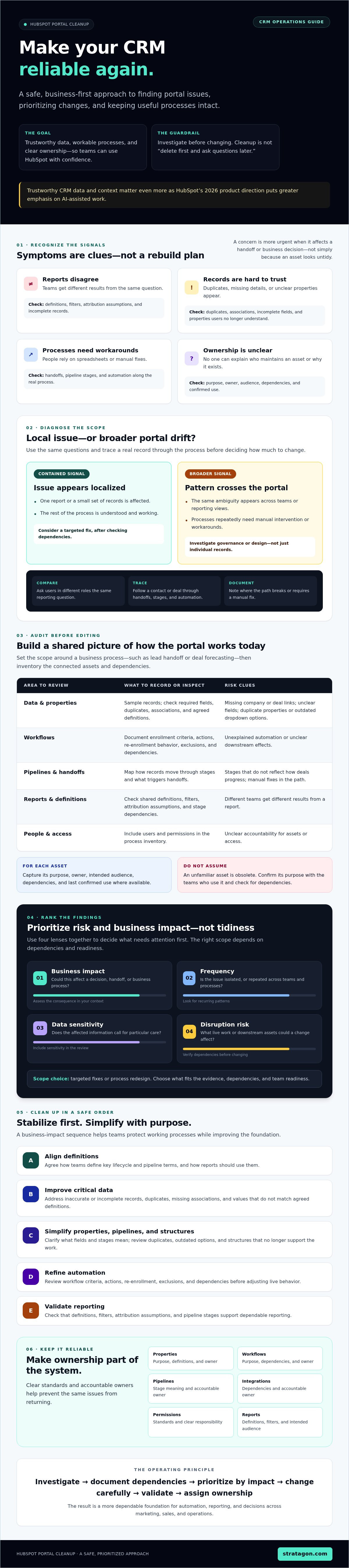
How to clean up HubSpot assets in a safe, prioritized order
Cleaning up your hubspot portal works best as a controlled sequence, not a race to remove the most assets. Start with issues that undermine trusted decisions or interrupt handoffs, then move to structural and technical changes. Before each change, define an owner, expected result, test plan, communication needs, and review date. This gives teams a clear way to check whether the adjustment worked.
Which HubSpot cleanup tasks should come first?
Use this order to avoid building downstream fixes on unreliable definitions or data:
- Align definitions: Confirm shared meanings for lifecycle stages, qualification, and pipeline statuses. Agree on the terms before changing fields or reports.
- Address critical data quality: Correct problems that affect segmentation, routing, or dependable reporting. For example, resolve inconsistent values in a field used to assign records before revising the routing automation.
- Simplify structures: Consolidate properties or pipeline stages only after confirming current team needs and checking dependent workflows, integrations, forms, and reports.
- Refine automation: Review a workflow’s purpose, owner, enrollment logic, and downstream effects before adjusting or retiring it. Keep automation that supports a valid process.
- Validate reporting: Recheck key reports after addressing the underlying definitions, data, and processes.
Choose tasks based on business impact and dependencies, not asset count. A single field used in routing and executive reporting may deserve attention before dozens of unused properties. Likewise, don’t change a workflow simply because its name is unclear. Confirm what it does and who relies on it first.
How should teams test and release portal changes?
Write down the intended behavior and expected result before changing a field, pipeline, or workflow. For a routing update, specify which records should qualify, where they should go, and what should happen to records that don’t meet the criteria. Test representative scenarios through a safe process before applying the change to live work.
After testing, verify affected records and check related reports, integrations, and user access. Tell the teams who use the asset what changed and where to raise issues. Record the decision, test outcome, owner, and review date so follow-up is part of the plan, not an afterthought.
If coordinating these dependencies across teams requires hands-on support, explore HubSpot implementation and optimization services.
How to keep a cleaned HubSpot portal reliable over time
A cleanup can lose its value if teams continue adding fields, changing processes, and building automation without a shared way to manage those changes. Governance keeps the portal aligned with how the business works. It doesn’t need to be complex, but it does need clear ownership and follow-through.
What should a HubSpot governance routine include?
Assign an accountable owner for each area: properties and shared definitions, workflows, pipelines, integrations, permissions, and reporting standards. Owners don’t have to make every decision alone. They should know who needs to review a proposed change and make sure its purpose, dependencies, and outcome are recorded.
Maintain a lightweight change log with the reason for each change, the owner, affected assets, approval, and result. Schedule recurring reviews for high-impact assets. Trigger a closer audit when a process changes, a team’s responsibilities shift, a new integration is introduced, or data and reports move unexpectedly.
Document shared definitions in language that marketing, sales, and operations can apply consistently. For example, specify what a lifecycle stage or pipeline status means and which team is responsible for updating it. This gives users a common reference as processes evolve instead of leaving them to rely on informal interpretations.
How can you measure whether portal cleanup is working?
Choose indicators tied to the problems the cleanup addressed. Depending on the process, these might include record completeness, duplicate rates, workflow exceptions, or consistency between reports that answer the same business question. Establish a baseline and define acceptable performance before assessing the results.
Numbers alone won’t show whether HubSpot supports the work. Ask users whether they still rely on spreadsheets, encounter confusing fields, or find that CRM processes match their actual responsibilities. Workarounds can signal that a technical change missed an operational need, even if a report appears consistent.
Review the same indicators after changes using comparable definitions and reporting periods. If the measure or its inputs have changed, document that before drawing conclusions. Treat unexpected shifts as a prompt to investigate, not proof of improvement or decline. This evidence-based routine turns cleaning up your hubspot portal from a one-time project into an ongoing practice that helps protect reliable data, automation, and decisions as the organization grows.
Make HubSpot a stronger foundation for growth
Cleaning up your hubspot portal doesn’t require a blank slate. Start with evidence: identify where data, processes, or reports fall short, then prioritize changes by business impact and dependencies. Test adjustments before release and give each important asset a clear owner. That sequence protects the work teams rely on while building a more dependable CRM.
Keep the gains through shared definitions, regular reviews, and measures that show whether records, automation, and reporting continue to meet business needs. With that governance in place, HubSpot can support clearer decisions and better coordination across marketing, sales, and operations as your business evolves.
For teams that need strategic support aligning their CRM with business processes, Stratagon lists HubSpot CRM implementation among its services. Founded in 2005, the agency brings together strategy, technology, and creative expertise. Explore strategic HubSpot and CRM support to discuss your next step. A practical, well-governed portal is within reach.
Frequently Asked Questions
How do you clean up a HubSpot portal?
Start by defining the business problem, then audit the assets connected to it. Review relevant records, properties, pipelines, workflows, reports, and permissions, and document their owners and dependencies. Prioritize changes by business impact and risk rather than appearance. Test updates before release, communicate them to affected teams, and log decisions and outcomes. Assign an owner for ongoing maintenance so cleaning up your HubSpot portal becomes a sustained practice, not a one-time project.
How often should you clean up your HubSpot portal?
Review critical assets on a recurring schedule that reflects how quickly your organization changes and the operational risk of an error. High-impact workflows, shared definitions, permissions, and reports may warrant closer attention than assets used infrequently. Reassess sooner after a process or team changes, or when you add an integration. Use unexplained shifts in data quality or reporting as a prompt to investigate rather than waiting for the next scheduled review.
Can you clean up HubSpot without deleting data?
Yes. Cleanup can involve clarifying definitions, correcting selected records, improving naming, assigning owners, or simplifying processes without deleting data. Before deleting or merging anything, confirm its purpose and check dependencies, retention needs, reporting effects, and integrations. A property that appears unused may still support a report or workflow. Set documented criteria and involve the appropriate asset owners so removal is an informed decision, not a cosmetic shortcut.
What should you clean up first in HubSpot?
Start with issues that undermine important decisions or create operational risk. Clarify shared definitions and address record-quality problems that affect segmentation, routing, or reporting before changing dependent automation. Then review structures and reports against current business needs. For example, confirm how teams use a pipeline stage before renaming or removing it. Prioritize by evidence, impact, and dependencies, not by which area looks messiest or has the most unused assets.
Does cleaning up a HubSpot portal require a full rebuild?
No. A disorganized portal doesn’t automatically need rebuilding. Targeted remediation is often more appropriate when the core data model and processes still support business needs and teams can correct specific problems safely. Consider broader redesign only when evidence shows that foundational structures repeatedly conflict with agreed processes and incremental changes aren’t viable. Before a rebuild, assess migration requirements, adoption, reporting continuity, dependencies, and the organization’s capacity to manage change.
How do you find unused HubSpot properties and workflows?
Combine available usage information with process reviews and conversations with the teams responsible for the assets. Check whether a property supports a current report, integration, workflow, segmentation, or decision. For workflows, document their purpose, owner, enrollment criteria, actions, and dependencies. Low visible activity alone doesn’t prove an asset has no value. Validate your findings with relevant stakeholders before archiving or editing anything, and record the reason for the decision.
How do you prevent HubSpot data from becoming messy again?
Assign owners for important properties, workflows, pipelines, permissions, and reporting definitions, and make each owner accountable for reviewing changes in their area. Keep a change log with the reason, affected assets, approval, and outcome. Set recurring reviews that match the level of risk, and revisit assets after process, team, or integration changes. Shared definitions help marketing, sales, and operations use CRM data consistently, while clear accountability can prevent duplicate fields and conflicting practices from taking hold.