How to set up advanced lead routing rules in HubSpot

Advanced lead routing rules in HubSpot work best when workflows match each lead to the right path using territory, team availability, account matches, CRM ownership, and prior relationships. Build branches around those criteria, then assign a lead to a specific owner or rotate it among the relevant team. HubSpot workflows can run around the clock, applying the routing criteria as leads become eligible.
Fast, consistent assignment matters, but speed alone does not ensure a reliable handoff. Sales teams also need routing logic that respects existing customer relationships, directs high-intent inquiries appropriately, and accounts for regional coverage.
This guide explains how to structure the workflow: define routing inputs, create territory and availability branches, match leads to accounts, preserve ownership history, and test each path before launch. Clear, maintainable rules turn complex assignment decisions into coordinated follow-up as your sales organization grows.
Key Takeaways
- Build workflow branches around territory and team coverage so each eligible lead reaches the right representative or assignment pool.
- Use reliable account-matching signals and define how workflows resolve duplicate matches or ownership conflicts.
- Preserve existing CRM ownership and relevant relationship history before assigning a record to someone new.
- Test routing paths against real scenarios, then refine the criteria as team structure and sales priorities change.
Territory and team routing with workflow branches
Advanced lead routing rules in HubSpot use contact-based workflows that branch by country, state or region, or a territory property. Each branch can assign a lead to one representative or rotate eligible records among a team, keeping distribution aligned with sales coverage.
Useful routing properties include location, territory, form submission, and lifecycle stage. Enrollment criteria determine which contacts enter a workflow, such as those who submit selected forms. Re-enrollment settings determine whether a contact can enter again after meeting the criteria, so configure them around changes that should trigger a new assignment.
Common routing errors include incomplete territory values, overlapping branches, and unintended owner rotation. Review enrollment history and branch conditions, then test sample records to identify where routing diverges.
- Define territory values first. Use consistent country, state, region, or territory-property values so each contact matches the intended branch.
- Separate form intent. Route high-intent demo requests toward sales, while lower-intent newsletter submissions can continue through nurture automation.
- Choose assignment logic by coverage. Assign a named representative when territory ownership is fixed, or rotate leads among the relevant team when coverage is shared.
- Plan for working hours. Teams spanning APAC, EMEA, and US regions can route by regional coverage, including leads arriving at 11 PM, 2 AM, or on weekends.
- Test immediate scheduling. HubSpot workflows operate 24 hours a day, 7 days a week, and assign leads when they meet routing criteria. Check sample paths and owner outcomes before activation.
Native HubSpot workflows don't provide account-based lead routing automatically, so build account-matching logic in workflow branches and define a path for unmatched records. For example, a five-representative territory team can test whether each regional branch reaches the intended pool before rotation begins. Advanced lead routing rules in HubSpot also benefit from RevOps reviewing assignment patterns alongside meeting outcomes and conversion rates.
Contact-based workflows can enroll contacts who submit any of a selected set of forms, then assign a contact or deal owner or rotate records among owners. HubSpot workflows can also assign a contact to a specific sales representative or rotate records among a team for round-robin assignment.
For cross-region coverage, route leads across APAC, EMEA, and US teams according to regional working hours and off-hours coverage, reflecting when teams are available.
Lead-to-account matching and ownership conflicts
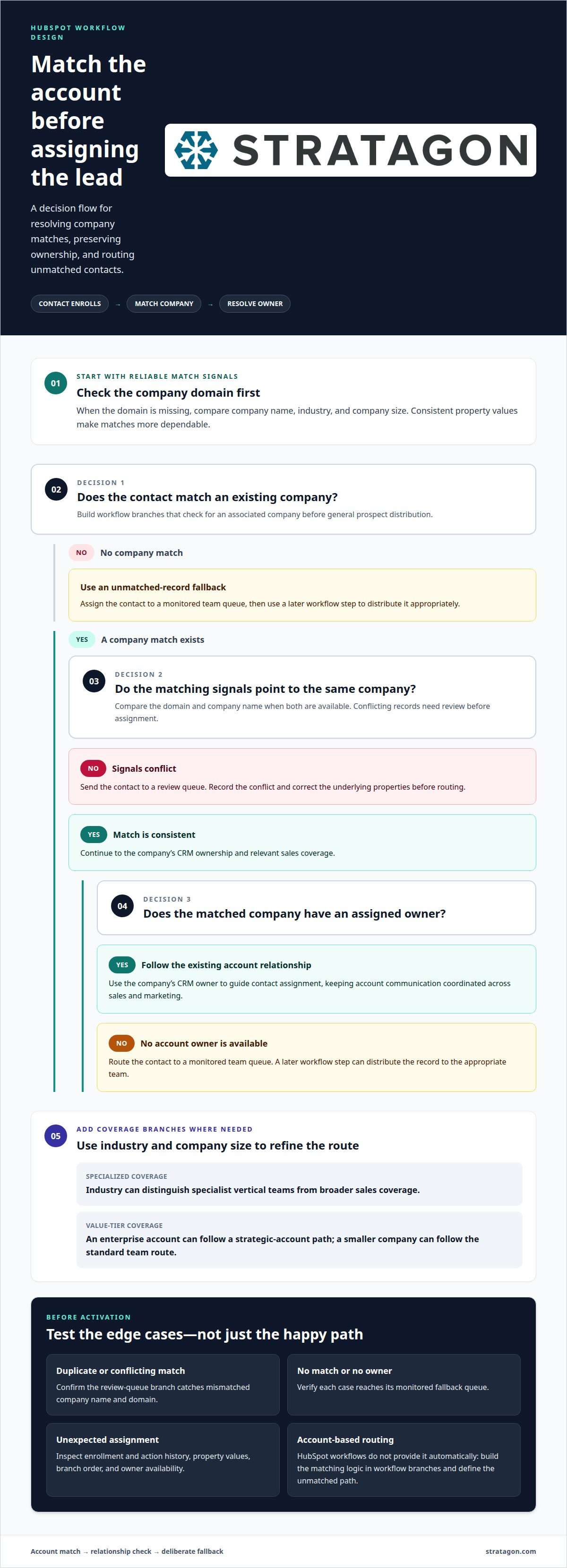
Prevent duplicate assignments by matching each incoming contact to an existing company record before assigning an owner. For unmatched leads, create a clear fallback branch that routes the record to a designated queue or team.
- Choose matching properties. Use company domain as a primary signal, then compare company name, industry, and company size when the domain is missing. Consistent values make account matches more dependable.
- Set the match order. Build workflow branches that check for an existing associated company first. For example, a contact using an established enterprise account’s domain should follow that account’s path rather than enter general prospect distribution.
- Route by account owner. When a match identifies a company with an assigned owner, use that CRM relationship to guide contact assignment. This keeps account communication coordinated across sales and marketing.
- Separate verticals and value tiers. Use industry and company-size properties to distinguish specialized vertical teams from broader sales coverage. An enterprise account can enter a strategic-account path, while a smaller company follows the standard team route.
- Resolve conflicting matches. If company name and domain point to different records, send the contact to a review queue instead of rotating it immediately. Record the conflict and correct the underlying properties before routing.
- Define an unassigned fallback. Create a branch for contacts with no company match or account owner. Assign those records to a monitored team queue, then use a later workflow step to distribute them appropriately.
Test duplicate and unmatched cases with sample records before activation. In HubSpot, inspect the workflow’s enrollment and action history when an assignment is missing or unexpected. Check property values, branch order, and owner availability to determine whether the issue stems from matching logic or incomplete CRM data.
When account relationships, ownership, and vertical segmentation call for coordinated workflow design, HubSpot CRM implementation can align the routing structure with your sales process.
Routing based on CRM ownership and historical relationships
Route by territory, company size, industry, or product interest using consistent CRM properties and workflow branches. For existing contacts, preserve the current owner and rotate only when no contact owner exists.
-
Apply territory-based routing
Set a territory property based on the prospect’s region, then use it as a workflow trigger. Map each territory value to its responsible sales team, with a clear fallback for missing or outdated values. Add company size, industry, or product interest as branch criteria when those factors determine sales specialization. Keep values consistent across records so a territory change updates the correct route without erasing a relevant account relationship.
-
Configure reassignment and overwrite logic
Define when a new assignment can replace an existing owner, and protect records with active CRM relationships. For example, route an inbound prospect to the current contact owner first; only use team rotation when the owner field is empty. A reassignment workflow can move a lead to the next representative if the assigned owner doesn’t update it within 2 hours. Another suggested rule reroutes records when no activity occurs for 24 hours. Choose a trigger that matches the team’s follow-up process, and avoid overwriting ownership simply because a prospect’s properties changed.
- Keep historical relationships visible in the routing logic. A previous meeting, open deal, or existing account association can indicate who should continue the conversation and protect revenue continuity. For manual round-robin distribution, maintain a spreadsheet that records the next representative and assignment history; this can suit teams receiving fewer than about 50 new leads a week. However, spreadsheets need careful upkeep and can create duplicate assignments when several people update them. Move the rotation into workflows as volume or team complexity grows, and use a territory-based trigger to direct prospects before assigning individual representatives.
A territory-first sequence can add geographic rules in Week 3 while preserving contact ownership as the primary safeguard: route existing contacts to their current contact owner, and rotate records only when no contact owner exists. In the geographic-territory use case, the company reported improving off-hours lead assignment from 0% to 100%, illustrating how defined territory coverage can support assignment beyond staffed hours.
How do advanced lead routing rules work in HubSpot?
HubSpot routing combines workflow enrollment, branch conditions, and assignment actions. Use these steps to connect lead context with a clear owner and follow-up path.
- Define the routing outcome. Decide whether each eligible record needs a specific representative, a team rotation, or a nurture path. For example, a qualified enterprise lead can enter an enterprise queue, while a contact below the qualification threshold stays in an appropriate marketing workflow.
- Set enrollment criteria. Choose contact properties and actions that should start the workflow, such as a form submission or a score threshold. A lead-scoring workflow example uses at least 50 score points for enrollment. Keep the criteria focused so unrelated records don’t enter the same assignment path.
- Allow key data to populate. If enrichment values inform routing, delay assignment by 5-10 minutes so those properties can populate first. Then branch using the available territory, account, ownership, and qualification context. This sequence helps prevent a premature assignment based on incomplete record data.
- Apply the assignment action. Route records to a named owner or rotate them among the eligible team. Keep the owner decision distinct from the branch criteria, so RevOps can identify whether a misroute came from incorrect data or assignment logic.
- Control re-enrollment and exceptions. Configure re-enrollment around meaningful changes that should trigger a new evaluation. Preserve an existing relationship when the contact already has an owner, and define a fallback for records that match no branch. Review workflow history to locate the step where an unexpected outcome occurred.
- Review performance and refine. Track assignment accuracy alongside lead follow-up outcomes. Review routing every quarter for balance, regional conversions, and changing team coverage. Use closed-won and closed-lost patterns to propose adjustments, then approve changes before updating live workflows.
For a coordinated workflow and CRM structure, align your HubSpot routing with CRM implementation.
Stratagon: HubSpot CRM Implementation
Stratagon helps businesses structure HubSpot CRM workflows around territory, account ownership, and sales processes. Turn to HubSpot CRM Implementation when routing rules have become difficult to maintain, ownership logic conflicts, or teams need a more consistent handoff between marketing and sales.
This work connects CRM configuration with the decisions behind it: which properties drive assignment, how teams handle unmatched records, and when an existing relationship should take priority. The result is a clearer framework for sales and RevOps to manage routing as territories, account strategies, and team structures evolve. Where broader process change is needed, digital transformation and Sales Enablement can help align the system with the people using it.
Contact Stratagon to discuss how your HubSpot routing structure can better support your sales process.
Make Routing a Scalable Revenue Capability
Lead routing should evolve with your sales strategy, not remain a fixed set of workflow branches. As account priorities, team responsibilities, and go-to-market motions change, reassess how your CRM supports timely, relevant conversations. The strongest advanced lead routing rules in HubSpot connect reliable data with clear ownership decisions while keeping the human context behind each relationship in view.
Stratagon can align HubSpot CRM Implementation with your sales process and broader digital transformation priorities. For organizations focused on strategic account engagement, Account-Based Marketing can also bring targeting and sales coordination into closer alignment.
Consider the next change your routing model needs, then discuss lead routing with Stratagon. A thoughtful operating model can give your teams a clearer foundation for growth.