How to Use Hreflang for Language-Specific Website Links

Language-specific pages need more than translated copy: search engines also need clear signals about which version serves each audience. With HubSpot CMS for multi-language websites, you can publish language variations, and HubSpot adds alternate-language links to multilingual content groups using ISO 639-1 language codes.
This structure connects related page versions, but it doesn’t replace regional adaptation or careful publishing. Content should reflect the language and context of its intended audience, and each version needs a clear path to its counterparts.
This guide explains how to adapt website content for different regions, create and publish language variations in HubSpot, and use hreflang to manage language-specific links. It also covers how HubSpot handles translated URLs and internal links, the limits of its multilingual tools, and what to review before publishing. You’ll find a practical framework for making a multilingual site easier for visitors to navigate and search engines to interpret.
Key Takeaways
- Adapt regional pages to the audience’s language and context, then use HubSpot’s language filter to locate content across site languages.
- Plan translated variations as distinct publishing assets; language-specific CTAs help keep each visitor’s next step relevant.
- Use hreflang signals to associate language versions, and understand how HubSpot handles alternate-language links for multilingual content groups.
- Account for platform limits, including the need to provide translations and the lack of automatic language redirection based on a visitor’s location.
Adapting website content for specific regions and countries
Use HubSpot language variations to tailor page content, then connect equivalent versions in language groups.
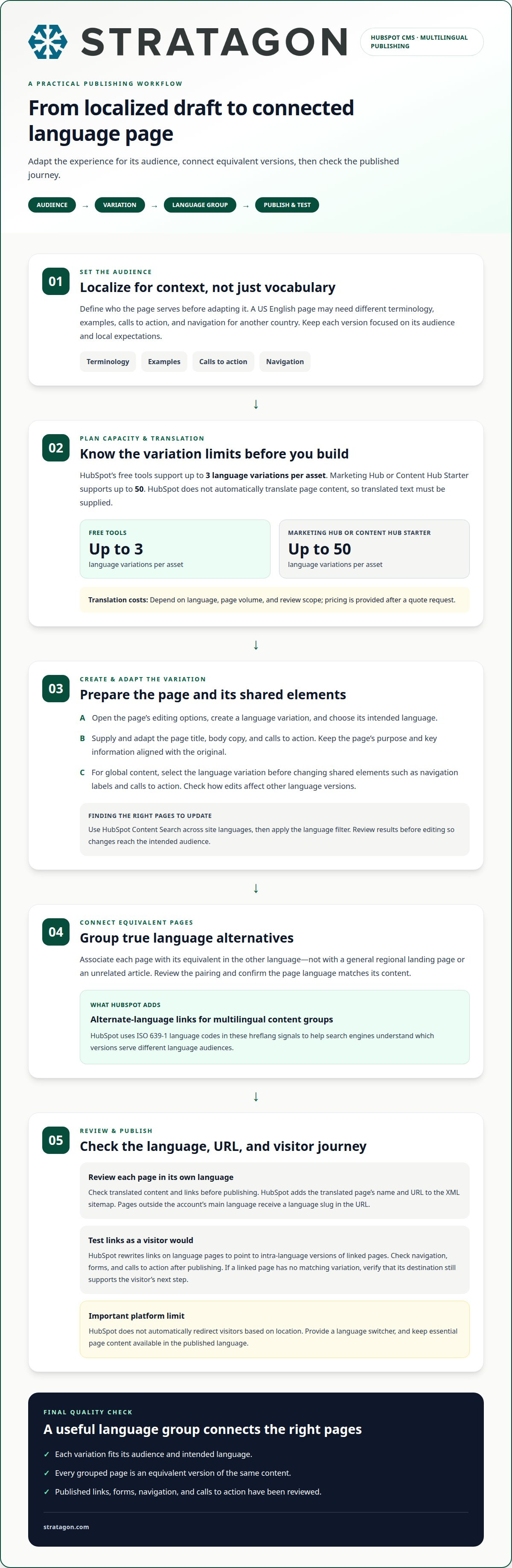
- Define each audience before adapting a page. For example, a US English page may need different terminology, examples, calls to action, and navigation than a page for another country. Adapt content to local expectations rather than changing words alone, and keep each version focused on its audience.
- Plan language capacity and translation work before publishing. HubSpot free tools support up to three language variations for each asset; Marketing Hub or Content Hub Starter supports up to 50. HubSpot doesn’t automatically translate page content. Translation costs depend on language, page volume, and review scope, and are provided after a quote request.
Edit Global Content by Language
Open the relevant global content module and select the language variation before editing shared elements. Update items such as navigation labels and calls to action for that audience, then review the page in its intended language. Keep localized wording consistent across related pages, and avoid changing shared content without checking its effect on other language versions.
Manage Multilingual Content Search
Use HubSpot Content Search to find website content across languages, then apply the language filter to narrow the results. For example, filter by language to locate pages that need updated terminology. This makes it easier to find the right versions without relying on page titles alone. Review the results before editing to ensure changes reach the intended audience.
- Group equivalent pages so HubSpot can connect their language versions with alternate-language links. For multilingual blogs, forms, and navigation, create and review audience-appropriate versions rather than assuming one translation updates every asset. JavaScript can display localized interface text, but keep essential page content available in the published language. HubSpot doesn’t automatically redirect visitors based on location, so provide a language switcher and review links, forms, and calls to action before publishing.
Creating and publishing language variations
Create each language version as a connected variation of its original page. Use these steps to create, review, and publish pages while keeping the relationship between versions clear.
Create Page Language Variations
Open the page in HubSpot and create a language variation from its editing options. Choose the intended language, then adapt the page title, body copy, and calls to action for that audience. HubSpot doesn’t automatically translate content, so supply the translated text rather than treating the new variation as a finished translation. Keep the page’s purpose and key information aligned with the original.
- Connect each variation to the matching page in its language group. For example, associate an English product page with its translated equivalent, not with a general regional landing page. This relationship helps HubSpot identify the pages as language alternatives. Review each association before publishing, especially if the site has similar pages for different countries.
Publish Language Variations
Review the translated page in its own language, then publish it when the content and links are ready. When you create a multilingual variation, HubSpot automatically adds the translated page’s name and URL to the XML sitemap. Pages in a language other than the account’s main language receive a language slug in the URL. Check that the URL is clear and that the variation serves the intended audience.
- Test the published page as a visitor would. Open its navigation, calls to action, and links to confirm they lead to relevant pages in the same language. HubSpot rewrites links on language pages to point to intra-language versions of linked pages, but review the site journey after publishing. If a linked page has no corresponding variation, ensure the destination still supports the visitor’s next step.
For multilingual pages, consider creating separate calls to action for each language and check that each variation uses the appropriate one. HubSpot CMS A/B testing lets users create 2 variants of a web or landing page to compare their performance, which can help assess language-specific page choices. For more dynamic pages, HubSpot CMS developers can use HubDB and CRM records as structured data sources to populate dynamic page content with HubL.
Using hreflang to manage language-specific links
To migrate a multilingual site without disrupting its search signals, map each existing page to its HubSpot destination and language equivalent. Preserve useful URLs where possible, and connect matching language versions in HubSpot content groups before launch.
- Inventory current URLs by language before moving content. Record each page’s purpose, current address, language, and equivalent pages. For example, pair an English service page with its translated counterpart, not with a regional homepage. This mapping gives the migration team a clear source-to-destination plan.
- Set up corresponding pages in HubSpot and group the language variations. HubSpot adds alternate-language links to multilingual content groups using ISO 639-1 language codes. These hreflang signals help search engines understand which versions serve different language audiences. Group only pages that provide equivalent content.
- Review each language relationship before launch. Confirm that every page in a group points to the correct alternative and that the page’s language matches its content. A mismatched pairing, such as linking a product page to an unrelated article, can confuse visitors and search engines.
- Map old URLs to their new destinations. Keep existing addresses when the migration structure allows; otherwise, direct each retired URL to its closest relevant replacement. Avoid sending every old page to the homepage. Update internal links so visitors and crawlers reach the new language-specific pages directly.
- Test the live site after launch. Open representative pages in each language, follow their alternate links, and confirm they lead to the intended destinations. Check that redirects preserve each page’s language and purpose. Use HubSpot’s SEO recommendations to identify optimization opportunities, then address issues on the affected page or in its language group.
- Maintain the mapping as pages change. When a language variation is added, removed, or moved, update its group and destination relationships. Connecting URL mapping, language content, and technical review in the migration plan helps teams identify broken paths quickly and keep page relationships coherent.
How does HubSpot CMS support multilingual websites?
HubSpot combines language variations with structured content and connected marketing tools. For a HubSpot CMS for multi-language websites setup, align subscription capacity, site architecture, and publishing workflows before expanding content.
- Match your language plan to the account’s subscription. HubSpot free tools support up to three language variations for each asset. Marketing Hub or Content Hub Starter supports up to 50. These limits help teams plan which assets and audiences the account can support.
- Use HubDB when repeated content needs a consistent structure across languages. A single table can store translated values in separate columns, then populate pages using HubL. For example, a location page can pull translated descriptions from the relevant fields. Developers can also use HubDB and CRM records as structured data sources.
- Use serverless functions only when a project requires custom server-side logic. HubSpot serverless functions are a Content Hub Enterprise feature. Include this distinction in a HubSpot CMS for multi-language websites plan when evaluating dynamic experiences or integrations beyond standard page modules.
- Test page performance with HubSpot CMS A/B testing, which lets users compare two web or landing page variants. Test a focused change, such as localized headline wording, so the results inform a specific content decision.
- Plan visitor navigation and system pages alongside language variations. HubSpot doesn’t automatically route visitors by GeoIP, so provide a language switcher. Its standard Language Switcher module is less flexible to customize. Native tools currently don’t support multilingual system pages such as 404 error pages.
- Align CMS setup with the wider customer experience. HubSpot connects website content with CRM, marketing, sales, and customer service tools, helping teams coordinate language-specific journeys. For support structuring a multilingual site and its connected systems, plan your HubSpot website implementation.
HubSpot doesn’t automatically direct website users to a language variation based on GeoIP, so visitors need to choose their own version. HubSpot advises adding a language-switcher module so visitors can switch between available translations. The standard Language Switcher module is less flexible to customize, so account for its constraints when deciding how to present the choice. Keep the route to other language versions clear and usable across the site.
Stratagon: HubSpot CRM Implementation
Stratagon helps organizations align HubSpot CRM with multilingual website experiences through HubSpot CRM Implementation. This is useful when language-specific pages, customer data, and marketing workflows need a coordinated structure instead of separate processes managed by different teams.
For a site migration or rebuild, Website Design & Development can connect page architecture with language variations and visitor journeys. Digital transformation can also align the technology and processes behind those experiences. The right approach depends on the website’s structure, audience needs, and how teams use HubSpot across marketing and sales.
Contact Stratagon to discuss how these capabilities can support your multilingual website.
Build the Next Stage of Your Multilingual Site
A multilingual website can strengthen the customer experience when its content strategy, technology, and commercial priorities work together. Treat each language version as an active part of the customer journey, with clear ownership of updates and a shared understanding of how localized experiences support business goals.
A well-planned hubspot cms for multi-language websites approach can also connect localized journeys with broader growth programs. Stratagon combines HubSpot CRM Implementation and digital transformation with Account-Based Marketing (ABM), helping organizations align technology, marketing, and sales around priority audiences. This is especially relevant when a site expansion changes how teams manage content and customer relationships across markets.
Start a conversation about your goals and the role your website should play in reaching them. Contact Stratagon to discuss your website. With a clear direction and coordinated execution, your next site initiative can create a more consistent experience for every audience.