HubSpot API Reporting Integrations for Marketing Teams

Reliable HubSpot API integration examples for reporting follow a clear pattern: sync contact and deal records, retrieve changes incrementally, and shape the data for analysis outside HubSpot. Batch read operations can return up to 10,000 records per request, while HubSpot search endpoints cap each request at 100 records. Those limits affect how a reporting workflow retrieves and refreshes data.
Marketing teams need more than a successful API call. They need trustworthy data connecting campaign activity, contact progression, and deal outcomes. This guide explains how to sync contacts and deals, structure API requests and responses, and extract data for external reporting. It also covers incremental updates, batching, rate limits, and retries, so the integration can keep supporting reporting as records and needs change. The aim is to align marketing and sales around data that informs decisions, not just move records between systems.
Key Takeaways
- Use a last-modified timestamp to identify changed contacts and deals, then refresh only the records your reports need.
- Design API requests around the reporting fields and relationships that matter, and handle errors with controlled retries.
- Separate CRM record data from website analytics data so traffic and conversion reporting can answer distinct questions.
- Align CRM implementation with marketing and sales reporting needs to make shared data more useful for decision-making.
Incremental contact and deal data synchronization
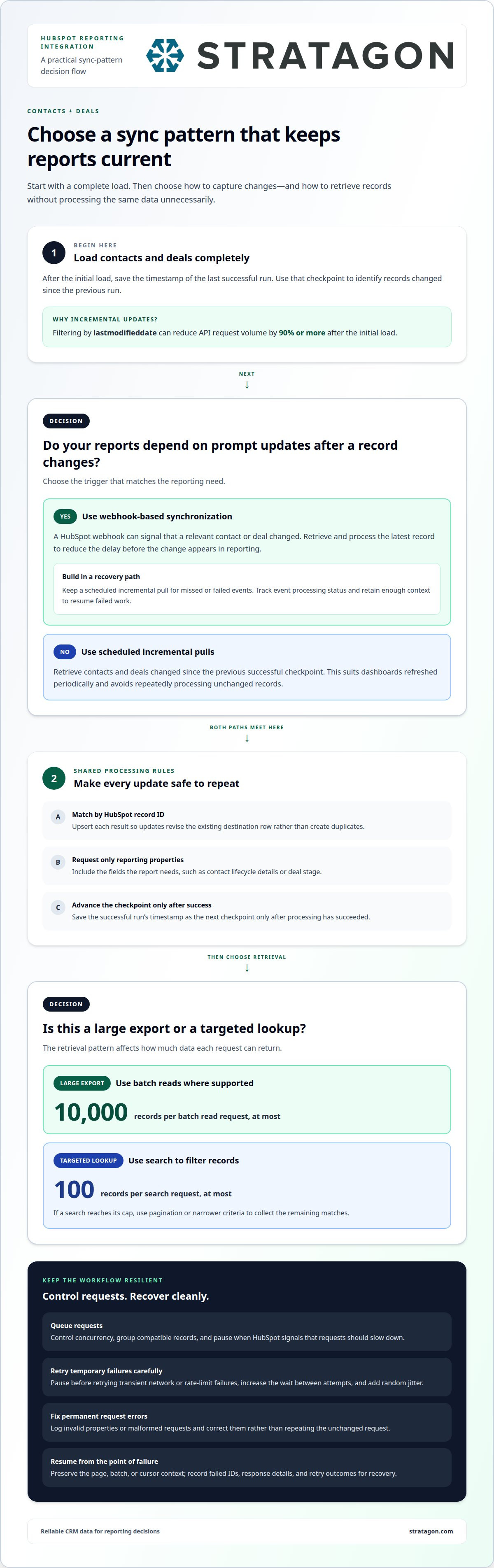
Start with a complete HubSpot contacts and deals load, then switch to incremental updates. A reporting integration can filter records by lastmodifieddate and retrieve records changed since its previous run. This avoids repeatedly processing unchanged contact and deal records. After the initial load, this approach can reduce API request volume by 90% or more. Store a successful run’s timestamp as the next synchronization checkpoint.
Build the process around a repeatable sequence: save the last successful checkpoint, request records changed since then, and upsert each result in the reporting destination. Use HubSpot record IDs as matching keys so updates revise existing rows instead of creating duplicates. Include the properties your reports need, such as contact lifecycle details or deal stage. Advance the checkpoint only after processing succeeds.
Webhook-based synchronization uses a different trigger. A HubSpot webhook can notify an integration when a relevant record changes, prompting it to retrieve and process the latest contact or deal data. This event-driven approach can reduce the delay before a change appears in a reporting system. Keep a scheduled incremental pull as a recovery path for missed or failed events, and use ID-based upserts to make repeated processing safe.
Real-time synchronization updates data across platforms as soon as a change occurs in one system. For example, a changed deal stage can appear in a revenue dashboard without waiting for the next scheduled batch. Timely updates still require handling retries, duplicate events, and temporary destination errors. Track each event’s processing status and retain enough context to resume failed work.
Choose the pattern based on the decisions your reports support. A scheduled incremental sync suits dashboards refreshed periodically; webhooks suit workflows that depend on prompt record updates. For Account-Based Marketing (ABM), combining contact and deal updates can link target-account engagement with pipeline movement. Match the selected properties and refresh cadence to the questions marketing and sales need their reports to answer.
HubSpot contact reports can use default or custom properties defined for the Contact object, passed through the Contacts API. API integrations allow software applications to share data without manual entry and can consolidate relevant information to support better-informed decisions.
Rate limits, request batching, and retry strategies
HubSpot integrations need to manage request volume as reporting datasets grow. Batch read operations can return up to 10,000 records per request. Search endpoints have a separate cap: 100 records per request. These limits apply to different retrieval patterns, so a reporting workflow should choose its endpoint based on the query and dataset.
For a large export, use batch reads where the endpoint supports the required object and properties. For a targeted lookup, search can filter records before retrieval. A search that reaches its 100-record cap needs pagination or narrower criteria to collect the remaining matches. Request only properties required by the report, since unnecessary fields increase response size and processing work.
Build a request queue instead of sending every call at once. The queue can control concurrency, group compatible records, and pause when HubSpot signals that requests should slow down. Track each request’s outcome and preserve its cursor or batch context. If a page fails, resume from that page rather than restarting the entire export.
Retries should distinguish temporary failures from permanent ones. For a transient network error or rate-limit response, pause before retrying and increase the wait between attempts. Add random jitter to avoid several workers retrying simultaneously. For invalid properties or malformed requests, log the error and fix the request instead of repeating it unchanged.
Make data writes idempotent: processing the same HubSpot record again should update its existing destination row, not create a duplicate. Record failed IDs, response details, and retry outcomes for later recovery. These controls help keep reports complete while protecting integrations from unnecessary traffic. Teams aligning API operations with broader system design can explore technology and marketing services as part of their planning.
API endpoints and request/response structure
HubSpot CRM API endpoints support creating, reading, writing, and editing Contact and Deal objects using JSON. When reviewing HubSpot API integration examples for reporting, match each endpoint to the data and decisions it needs to support.
Endpoint Selection
Choose a HubSpot CRM endpoint based on the object and reporting task. Retrieve contact data through the Contacts API, using default or custom Contact properties. Deal requests retrieve or update opportunity records. Select the relevant properties before building the request so the response includes fields your report can use.
For example, a campaign report might need contact source and lifecycle properties, while a pipeline view needs deal stage and value. Align Contact and Deal retrieval with the reporting question. The endpoint and property set determine what data the integration can bring into the reporting workflow.
Request and Response Formats
HubSpot CRM requests and responses use JSON, a structured format of named fields and values. A read request identifies the object and needed properties; a write request supplies values to create or update. For example, a Contact payload can include a custom campaign property, while a Deal payload can include its reporting stage.
After each request, parse the JSON response and map the returned properties into your reporting model. Keep the HubSpot record ID with each row so later updates match the correct contact or deal. Handle response status separately from the data: successful records can proceed to reporting, while errors should be logged for diagnosis.
Python and JavaScript Examples
A JavaScript read can use fetch with an endpoint variable and authorization header, then parse the JSON with response.json(). In Python, an HTTP request can send the same endpoint and authorization information before parsing the returned JSON. These HubSpot API integration examples for reporting follow the same sequence: authenticate, request selected properties, inspect the response, and map records.
Keep credentials out of the request body and never log secret values. A practical workflow stores parsed Contact or Deal properties alongside the record ID. Python or JavaScript can then transform those fields into rows for a dashboard or analytics destination, while preserving the link to the original CRM record.
HubSpot Analytics API examples for website traffic and conversion reporting
The HubSpot Analytics API retrieves data for analysis rather than creating HubSpot reports. HubSpot API integration examples for reporting can show how to connect extracted analytics with clearly defined traffic and conversion measures.
Start by deciding what the report needs to explain. A traffic view might compare website visits by source, while a conversion view might connect a campaign interaction with a later CRM outcome. Treat these as reporting questions, not assumed API fields: identify the available data, then map it to the measures your team needs. This helps marketing and sales agree on what conversion means.
Google Analytics connected with HubSpot can provide website visitor insights within the CRM. For example, a marketer can consider visitor context alongside contact and deal information to examine how website activity relates to customer progression. HubSpot API integration examples for reporting can illustrate how an integration consolidates relevant data from separate systems. Keep each source identifiable in the reporting model to preserve context.
Structure the extract around a consistent reporting workflow. First, retrieve the analytics data needed to answer the chosen question. Next, standardize dates, campaign labels, and source names before combining records. Then link CRM information only when a shared identifier supports the match. For example, a campaign report can show traffic measures beside related contact or deal outcomes without treating every website visit as a known contact.
Keep interpretation separate from extraction. A successful API response means data was retrieved, not that attribution is defined correctly. Document the source of each measure, how conversions are grouped, and the time period represented. This helps teams interpret the same dashboard consistently and avoids confusing traffic totals with CRM outcomes.
For reporting that connects website activity with CRM processes, plan your HubSpot integration around the questions marketing and sales need answered.
Stratagon: HubSpot CRM Implementation
Stratagon’s HubSpot CRM Implementation aligns reporting workflows with how marketing and sales teams use CRM data. Turn to this service when contact and deal records, reporting definitions, or team processes need better alignment. The implementation can help structure CRM data and workflows around the decisions your dashboards need to support, rather than treating API requests as a standalone technical task.
For organizations coordinating target-account campaigns, Account-Based Marketing (ABM) can connect account priorities with CRM processes. Digital transformation and Sales Enablement can also support broader operational alignment when reporting changes affect multiple teams. Start by defining the reporting questions, the records involved, and how teams will use the resulting data.
Contact Stratagon to discuss how HubSpot CRM Implementation can support your reporting needs.
Turn reporting into a shared operating advantage
Make reporting part of how teams set priorities and act on them. Agree on the decisions each dashboard should support, who owns its measures, and how marketing and sales will use consistent definitions. That clarity keeps technical integration connected to business outcomes as goals evolve.
Use hubspot API integration examples for reporting as a starting point, then shape the data model around your organization’s priorities. Stratagon’s HubSpot CRM Implementation can align CRM workflows with reporting needs, while Digital Transformation and Account-Based Marketing (ABM) support broader operational and campaign goals. A sound design connects systems, measures, and team responsibilities without treating the API as the strategy.
Discuss your HubSpot integration with Stratagon and identify a practical next step for your reporting approach. With clear ownership and aligned priorities, your teams can turn connected data into more confident decisions.
Frequently Asked Questions
How to create custom reports in HubSpot using the API?
Use the HubSpot Analytics API to retrieve data for analysis, then build the report outside HubSpot. The CRM API can read Contact and Deal data in JSON, but creating HubSpot reports and dashboards through the API was reported as not possible at the time.
How to export HubSpot data to Power BI, Tableau, or Looker Studio?
Retrieve the Contact, Deal, or analytics data needed for the report, parse the JSON responses, and map selected fields into rows for an external dashboard or analytics destination. Keep HubSpot record IDs with CRM data so later updates can match existing records.