HubSpot Data Migration Checklist: Plan, Move, and Validate Your CRM Data

What if the biggest risk in a HubSpot migration isn’t moving too little data, but carrying every data-quality problem into a new CRM? A practical hubspot data migration checklist helps you decide which records, fields, and activity history matter before the transfer begins. It also gives teams a shared plan for handling duplicates, inconsistent values, and record relationships.
It’s reasonable to focus first on getting data into HubSpot. But a reliable migration is more than an import: it’s a governed project that connects data decisions to team workflows and reporting needs. The right approach depends on data volume, complexity, and internal capacity. A manual import may suit a straightforward move, while a more involved migration may call for technical support or an implementation partner.
This checklist covers readiness, data cleanup and mapping, migration planning, and post-migration validation. You’ll assess what to move, compare approaches and their trade-offs, then test records, associations, and reports before teams rely on the CRM. The goal is a HubSpot portal that supports aligned teams and dependable decisions, not simply a completed transfer.
Key Takeaways
- Use a hubspot data migration checklist to define which records, activities, files, and integrations belong in scope.
- Audit duplicates, incomplete values, outdated data, and property purpose before mapping source fields to HubSpot.
- Compare native imports, API-led transfers, and specialist support based on complexity, validation needs, and team capacity.
- Test representative records and associations, reconcile results, and approve the cutover before teams depend on the new CRM.
- Clarify project responsibilities, deliverables, assumptions, and knowledge transfer so the migration supports lasting adoption.
HubSpot Data Migration Checklist: Define the Scope Before Moving Records
Start with the business reason for the move. Are you bringing sales and marketing onto a shared view of prospects, improving service handoffs, or replacing a system that no longer supports your workflows? The answer should shape what enters HubSpot and what a successful launch needs to make possible, such as finding usable records, assigning clear ownership, and producing dependable reports.
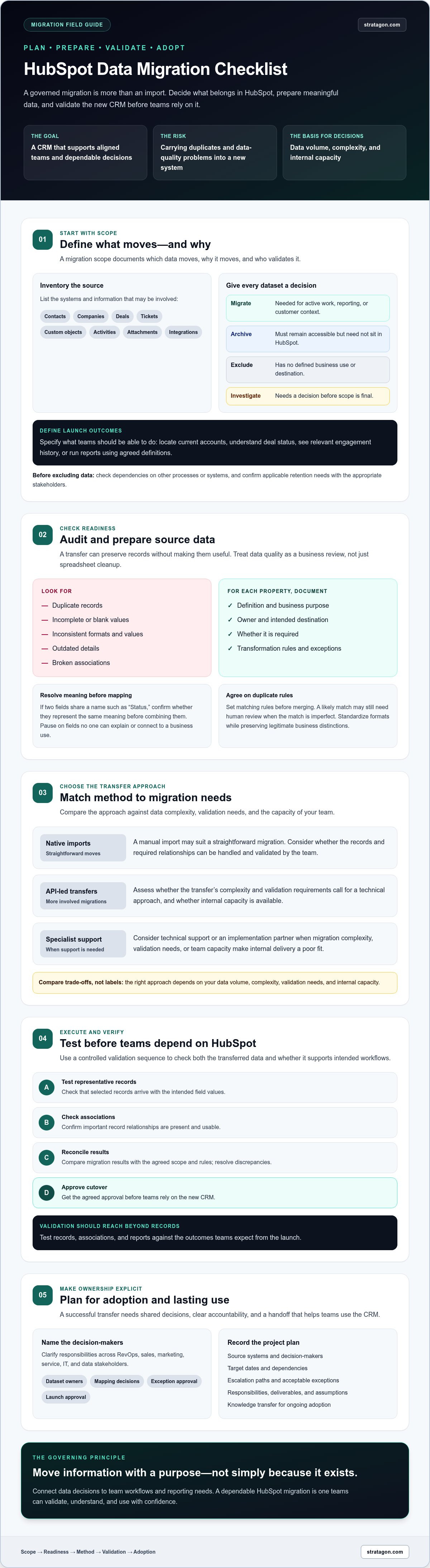
A migration involves selecting, preparing, extracting, transforming, and validating information. The Data migration process is easier to govern when you make those decisions before records move. A useful definition to include in your plan is: A migration scope documents which data moves, why it moves, and who validates it.
Which data should move into HubSpot?
Inventory the source systems and the information they hold: contacts, companies, deals, tickets, custom objects, activities, attachments, and integrations, where relevant. Don’t assume every historical record belongs in the new CRM. For each dataset, record a decision, a business owner, and the reason:
- Migrate: Information teams need for active work, reporting, or customer context.
- Archive: Historical information that must remain accessible but doesn’t need to sit in HubSpot.
- Exclude: Data with no defined business use or destination.
- Investigate: Records or dependencies that need a decision before scope is final.
Before excluding anything, check whether another process or system relies on it and confirm applicable retention needs with the appropriate stakeholders. For example, an old activity may seem irrelevant to sales but still provide context for a service handoff. Identify those dependencies early rather than discovering them during cutover.
Set migration goals and ownership
Translate the business reason into observable launch criteria. “Move customer data” is too broad. Define what teams should be able to do in HubSpot: locate current accounts, understand deal status, see relevant engagement history, or run reports using agreed definitions. These outcomes give reviewers a practical basis for approving the migration.
Assign decision rights across RevOps, sales, marketing, service, IT, and data stakeholders. Name who owns each dataset, resolves mapping questions, approves exceptions, and gives final launch approval. Then record the source systems, decision-makers, target dates, dependencies, escalation paths, and acceptable exceptions in the project plan.
A well-scoped hubspot data migration checklist turns these decisions into shared expectations. It helps teams estimate effort based on actual sources and dependencies, while keeping data choices connected to the workflows HubSpot must support.
HubSpot Migration Readiness Checklist: Audit and Prepare Your Source Data
Once the migration scope is clear, assess whether the source data is ready to move. A transfer can preserve records without making them useful. Duplicates, blank values, inconsistent formats, outdated details, and broken associations can undermine reporting and make teams question the new CRM. Treat this audit as a business review, not just a spreadsheet cleanup exercise.
A practical rule: map a source field only when its meaning and business use are understood. If no one can explain what a field represents or who relies on it, pause before creating a HubSpot destination. The hubspot data migration checklist should capture field decisions, transformation rules, and exceptions so the migration team applies them consistently.
Audit properties, data quality, and duplicates
Compare source properties with the HubSpot properties teams expect to use. For each field, document its definition, owner, intended destination, whether it’s required, and any transformation. Flag gaps, conflicting meanings, and redundant fields. For example, two source fields called “Status” may track different stages. Combining them without confirming their definitions could distort reports.
Agree on duplicate-matching rules before merging records. A shared email address may identify a likely contact match, but imperfect matches may need human review rather than automatic consolidation. Standardize formats and approved values, such as date conventions or industry labels, while preserving distinctions that support legitimate business needs.
- Identify missing, invalid, stale, or inconsistently formatted values.
- Record controlled vocabularies and field transformations.
- Flag records that need a named reviewer to resolve ambiguity.
Plan associations, consent, and data access
Map how contacts, companies, deals, tickets, and other relevant records connect. A contact linked to the wrong company can affect account visibility and downstream reporting, even if every individual field appears correct. Document the intended relationship and how the migration will preserve or recreate it.
Review communication permissions and subscription data before transferring marketing information. Confirm applicable requirements with qualified counsel rather than assuming that a source-system setting automatically translates to the new environment. Also define who can access exports and working files, how sensitive data will be handled, and what retention procedures apply.
For complex field definitions, associations, or cross-team workflows, experienced support can help align data decisions with how people will use HubSpot. Stratagon’s HubSpot CRM implementation services may be relevant when the readiness work exceeds your team’s internal capacity.
HubSpot Data Migration Methods Compared: Choose the Right Transfer Approach
The right transfer method depends on the source system, the structure of its data, the history teams need, and the capabilities available in your HubSpot account. A straightforward set of records may suit a native import. Complex transformations, recurring data flows, or tightly connected records can call for an API-led approach or implementation support.
No method guarantees complete, correctly mapped, usable data on its own. The hubspot data migration checklist should account for how each option will be tested, reconciled, and reviewed, not just how records will be transferred.
Native imports
- Control: Direct control over prepared files and field mappings.
- Repeatability: Reusable for structured batches, though each run needs careful preparation.
- Transformations: Best suited to data that can be cleaned and formatted before import.
- Validation: Requires planned checks for errors, associations, and omissions.
- Internal effort: The team prepares files, maps fields, runs imports, and handles exceptions.
API or integration-led transfers
- Control: Greater flexibility over transfer logic, subject to system access and technical design.
- Repeatability: Can support repeatable or ongoing transfers when configured for that purpose.
- Transformations: Useful for complex rules, data relationships, or recurring synchronization.
- Validation: Requires designed checks, error handling, and reconciliation.
- Internal effort: Needs technical ownership, testing, and ongoing maintenance planning.
Specialist-supported migration
- Control: Shared between your organization and the support team, with decision rights agreed in advance.
- Repeatability: Depends on documented processes, tools, and handover.
- Transformations: Support can help address complex mappings and relationships.
- Validation: Agree on evidence, approvals, and exception handling in the project scope.
- Internal effort: Reduces reliance on internal delivery capacity but still requires stakeholder input and decisions.
When are native imports a practical fit?
Native imports can work well for well-understood datasets that fit HubSpot’s current import capabilities and have manageable mapping requirements. Before choosing this route, check HubSpot’s official documentation for current object, association, file, and property requirements. Run repeatable test imports and define how you’ll resolve exceptions. A successful small trial doesn’t prove every record type or edge case is ready.
When should teams evaluate technical or partner support?
Consider API or integration-led transfers when transformations, complex relationships, or recurring syncs exceed what a file-based process can reliably handle. Implementation support may also help when internal capacity, technical ownership, or alignment across sales, marketing, service, and IT is limited. Evaluate potential providers on scope clarity, security practices, validation evidence, knowledge transfer, and accountable ownership. Choose the approach that fits your migration’s complexity, not simply the one that moves records fastest.
HubSpot Data Migration Execution Checklist: Test, Cut Over, and Validate
A transfer is ready for launch only when the data works for the people who rely on it. Follow a controlled sequence: prepare a test set, map, test, reconcile, approve, cut over, and monitor. This keeps teams from treating a completed import as proof that records, relationships, and workflows are ready.
Reconciliation means checking migrated records against agreed source data and rules. Compare source and destination counts, but don’t stop there. Matching totals can hide missing fields, incorrect associations, duplicate records, or values mapped to the wrong properties. Investigate exceptions and confirm that records support real business tasks.
Run a representative test migration
Build a test set that reflects normal records and the cases most likely to expose mapping issues: records with missing values, potential duplicates, multiple relationships, and important activity history. Map the fields, run the test, and have sales, marketing, service, and operations users complete representative tasks in the destination portal.
Check property values, associations, activities, permissions, and critical workflows. For example, confirm that a sales user can identify the right company for a contact and that a relevant activity is visible to the team that needs it. Record each defect, its owner, its resolution, and the retest outcome. Approve the migration only after successful retesting, not just a technically completed import.
Control cutover and post-migration validation
Before the final transfer, agree on a source-system change window, data-freeze rules, transfer order, and escalation contacts. Decide how teams will handle records changed during the freeze and who can authorize an exception. These controls reduce uncertainty at cutover and help stakeholders understand when to use the new portal.
After the final transfer, compare record counts and investigate differences. Then sample critical records and verify associations, ownership, required history, permissions, reports, and connected processes. Document how exceptions will be resolved, who communicates status to users, and who monitors data quality and workflow performance after launch. Set rollback decision criteria in advance so the team knows how it will respond if a material issue blocks business-critical work.
- Prepare and map: Select representative records and confirm field destinations.
- Test and reconcile: Validate data and relationships against agreed rules.
- Approve and cut over: Obtain sign-off, follow the transfer plan, and communicate the change.
- Monitor: Assign owners to review issues and confirm that teams can use the CRM as intended.
Use this execution sequence as the operational core of your hubspot data migration checklist. If your team needs help coordinating migration testing, cutover, and HubSpot readiness, explore Stratagon’s HubSpot CRM implementation services.
From HubSpot Migration Checklist to Adoption: Decide What Support You Need
A migration can be technically complete yet leave teams unsure how to use the new CRM. Choose support based on the work your organization needs to coordinate, not only the volume of records. Assess internal capacity, data complexity, stakeholder alignment, timeline, and the risk of disrupting day-to-day processes. A straightforward dataset with clear ownership may be manageable internally. Multiple source systems, complex relationships, or competing team requirements may call for additional implementation support.
Evaluate migration support beyond the transfer
Before selecting an internal team or external partner, clarify who will own data decisions, technical execution, user acceptance, and post-launch issue resolution. Ask how the project will connect data design with sales, marketing, and service processes, and what documentation, training, and knowledge transfer will prepare internal teams to manage HubSpot after the work is complete.
A strong project scope should name responsibilities and deliverables, document assumptions and dependencies, explain how validation and acceptance will work, and define how knowledge will be handed over. If your migration spans multiple teams and workflows, Stratagon’s HubSpot CRM implementation services may be relevant. Stratagon combines HubSpot CRM implementation with strategic consulting, helping organizations consider migration as part of broader process alignment.
Turn the checklist into a practical project plan
Use your hubspot data migration checklist findings to build a plan with distinct workstreams, accountable owners, dependencies, decision points, and measurable acceptance criteria. For example, define what evidence must be reviewed before a dataset is approved, who resolves an exception, and which business users confirm that records support their intended workflows.
Confirm the scope and current HubSpot platform constraints before committing to a transfer method or launch date. Object availability, association requirements, source-system access, and technical dependencies can affect sequencing and effort. Treat unresolved assumptions as decisions to close, not details to leave until cutover.
The right support model should leave your organization with more than transferred data. It should make ownership clear, prepare teams to work in the CRM, and give internal stakeholders the context to maintain the setup. If your migration readiness review points to gaps in capacity or cross-functional coordination, discuss a structured CRM implementation plan with Stratagon to explore practical next steps for your HubSpot migration.
Move Forward With a CRM Your Teams Can Trust
A successful migration starts with clear decisions about what data belongs in HubSpot and who owns its quality. Use your hubspot data migration checklist to turn those decisions into a practical sequence: prepare and map the data, choose a transfer approach that fits its complexity, then test, reconcile, and monitor the result.
Keep the business purpose in view throughout. Records should support the workflows, reporting, and collaboration your teams need, not simply reproduce the structure of a legacy system. Clear responsibilities, realistic acceptance criteria, and knowledge transfer help make the new CRM usable beyond launch.
When migration work spans systems, teams, and processes, experienced implementation support can help bring the pieces together. Stratagon, founded in 2005, is a HubSpot partner with CRM implementation expertise and a strategic focus on marketing and technology.
Discuss your HubSpot migration and implementation needs with Stratagon to consider your readiness, priorities, and next steps. A well-planned move can give your teams a stronger foundation for confident CRM use and more reliable decisions.
Frequently Asked Questions
Can I migrate data into HubSpot myself?
Yes, teams can migrate data themselves when the source data and requirements fit HubSpot’s documented import options. Use a hubspot data migration checklist to confirm source fields, prepare mappings, and select representative records for a test import. Check current HubSpot product documentation for supported objects, associations, and file requirements. If the move involves complex relationships, transformations, integrations, or limited internal capacity, evaluate technical or implementation support before committing.
What data should I migrate to HubSpot?
Migrate the information that supports your business goals and ongoing operations, not automatically every record in the source system. Assess relevant records, properties, associations, activities, files, and permission data against how teams will use them. Assign a business owner to each dataset, then classify it as migrate, archive, exclude, or investigate. Before excluding historical information, check whether teams or connected processes still depend on it.
How do I prevent duplicate records during a HubSpot migration?
Profile the source data, agree on matching and merge rules, standardize key values, and test representative duplicate scenarios before the full transfer. Decide which record remains authoritative when two records overlap, and route uncertain matches for review instead of merging them automatically. Then verify how HubSpot currently handles imports and deduplication in its official documentation. Test the chosen rules against realistic examples and inspect the results before proceeding.
Will a HubSpot migration preserve all my CRM history?
Not necessarily. History transfer depends on the source platform, the data type, the selected migration method, and HubSpot’s current capabilities. List the activities and historical context teams need, confirm technical feasibility, and test sample records to see what can be retained and how it appears in HubSpot. Ask business owners to approve any exclusions or changes to historical visibility. Don’t assume a transfer will preserve every detail automatically.
How do I validate a HubSpot data migration?
Check representative records against agreed requirements, including field values, associations, ownership, critical activities, permissions, reports, and connected workflows. Compare source and destination record counts to identify discrepancies, but remember that matching totals don’t prove that every field or relationship is correct. Document exceptions, assign an owner to each issue, and retest fixes. Obtain approval from the relevant business users before accepting the migration as complete.
Should I use a migration tool or a HubSpot implementation partner?
A migration tool may suit a well-scoped transfer when the data is compatible and your team has technical ownership. A HubSpot implementation partner may be useful for complex mapping, process alignment, testing, or stakeholder coordination. Stratagon is a HubSpot partner with CRM implementation expertise. Compare options based on scope clarity, security practices, validation evidence, knowledge transfer, and accountability. Neither a tool nor a partner is automatically the right fit for every migration.
How long does a HubSpot data migration take?
Timing depends on source-system access, data volume and quality, mapping complexity, integrations, stakeholder availability, and testing requirements. Avoid treating a generic estimate as a promise for your project. Complete discovery and a representative test before setting a realistic schedule, then account for exception resolution and user acceptance. Clear ownership and timely decisions can help teams plan the work, but unresolved dependencies may affect the timeline.