HubSpot Operations Hub Use Cases: 7 Ways to Improve Data and Processes

What if the biggest drag on growth isn’t a lack of data, but the work required to make it trustworthy and useful? The hubspot operations hub use cases that matter most tackle familiar problems: inconsistent customer records, manual handoffs between teams, and reports leaders can’t confidently act on.
HubSpot Operations Hub, rebranded as Data Hub in late 2025, is more than a collection of data tools. When clean, connected information supports reliable processes, marketing, sales, and operations can work from a clearer picture of the customer and spend less time correcting avoidable issues.
This guide covers seven practical use cases, from syncing data across systems to standardizing records and automating workflows. You’ll learn how to connect each opportunity to a measurable business need, assess the data and integrations involved, and choose a manageable first workflow. The goal isn’t to automate everything at once. It’s to improve one process in a way your teams can adopt, measure, and build on.
Key Takeaways
- HubSpot Operations Hub, now called Data Hub, supports connected CRM, marketing, sales, and service processes by helping teams work with consistent data.
- Explore hubspot operations hub use cases by starting with an operational problem, such as inconsistent CRM values, disconnected systems, or a manual handoff.
- Match each workflow to the team it serves, the friction it addresses, and the data or integration it depends on.
- Prioritize a repetitive, visible process with clear ownership and understood source data, then define a measure of progress before configuring it.
- Build for adoption as well as automation: align teams, document the process, test and train, then refine governance and data quality over time.
What HubSpot Operations Hub Does for Connected Business Operations
HubSpot Operations Hub, rebranded as Data Hub in late 2025, provides capabilities for syncing, standardizing, and using business data across connected systems. Its role is operational: it helps teams maintain information that marketing, sales, and service workflows can rely on, and supports automation for work that would otherwise require repeated manual effort. HubSpot’s product suite brings customer and company records together with tools for distinct business functions. HubSpot’s CRM platform provides broader context for how those functions fit together.
Data organization and process improvement are related, but they aren’t the same. Standardizing a property can make records more consistent. A workflow that uses that property to route a request or trigger a handoff changes how work gets done. Strong hubspot operations hub use cases connect the two: they improve information quality and make a recurring business process more reliable.
How Operations Hub fits into the HubSpot ecosystem
CRM records hold information about contacts, companies, deals, and other business activity. Marketing, sales, and service teams use that information in their daily workflows. Data Hub complements these tools by helping keep records aligned across connected applications, improving data quality, and supporting more tailored automation. For example, consistent lifecycle data can help marketing segment audiences while giving sales a clearer signal about when a lead is ready for follow-up.
That connection works only when teams agree on what fields mean and how processes should respond to them. A synced value is useful when it comes from the right source and is applied consistently. A workflow is useful when it supports an agreed handoff, rather than moving inaccurate or incomplete information faster. Available capabilities and their names can vary by HubSpot packaging and change over time, so confirm current feature access and subscription requirements before implementation.
What operational problems it is designed to address
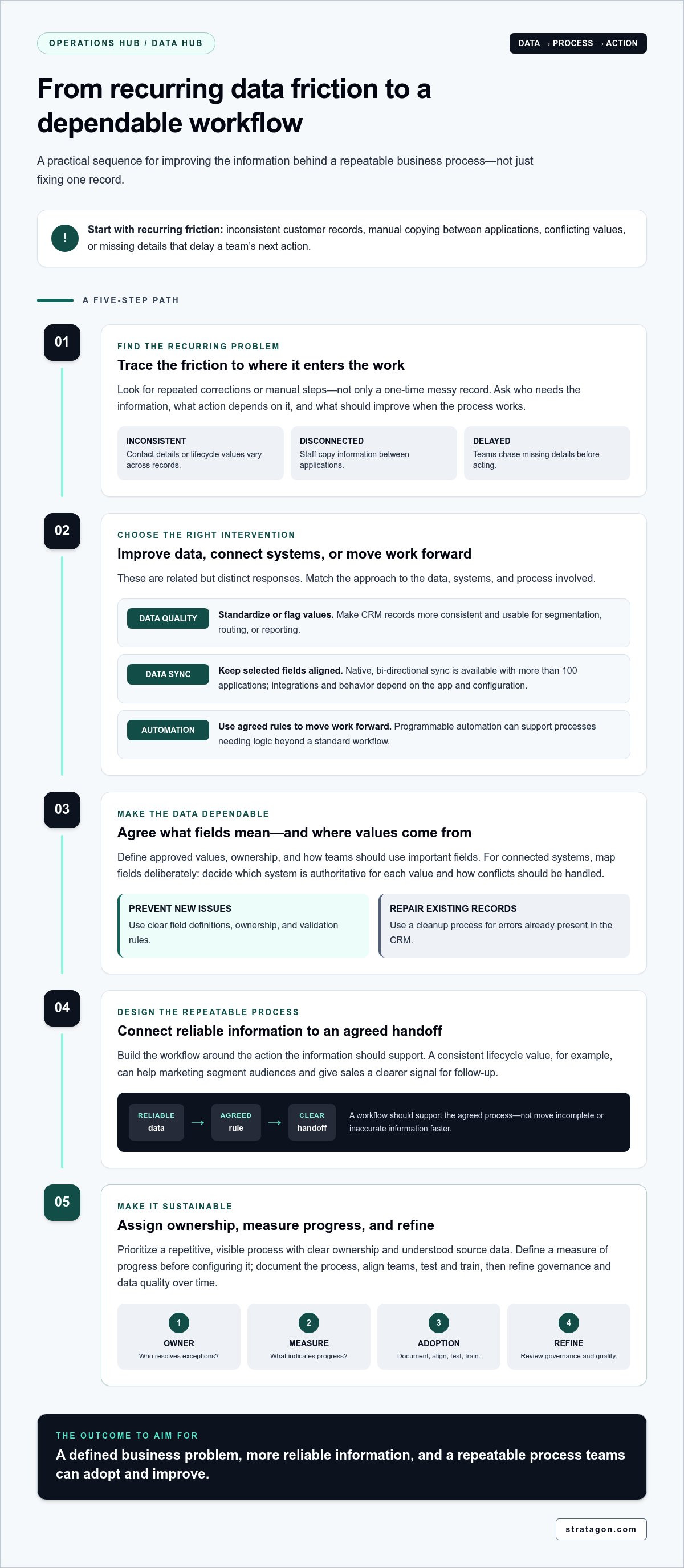
Look for recurring friction, not just a messy record that needs a one-time fix. Examples include contact details formatted differently across systems, staff copying information between applications, or teams working from conflicting values. Data sync can help keep connected systems aligned; data quality automation can standardize or flag inconsistent values; and programmable automation can support processes that need logic beyond a standard workflow. The right approach depends on the data, systems, and process involved.
A one-time cleanup may correct a batch of records, but it won’t prevent the same issue from returning. A recurring process needs an owner, a clear rule for handling exceptions, and a way to monitor whether the information stays usable. If a team repeatedly corrects the same field or chases missing details before acting, investigate what causes the friction and where it enters the workflow.
An Operations Hub use case is a defined business problem where better-connected, more reliable data enables a repeatable process to work with less friction. This frames the opportunity around an outcome, not a feature checklist: identify who needs the information, what action depends on it, and what should improve when the process works as intended.
HubSpot Operations Hub Use Cases for Data Quality, Sync, and Automation
The strongest hubspot operations hub use cases begin with a recurring operational problem, then match it to the right response: improve the data, connect systems, or automate the work that depends on that information. HubSpot Operations Hub was rebranded as Data Hub in late 2025. Its capabilities include data quality automation, data sync, and programmable automation, with access depending on HubSpot packaging.
Think of these as connected but distinct interventions. Cleaning inconsistent values makes records more usable. Syncing keeps supported connected systems aligned. Automation uses data and agreed rules to move work forward. The Gartner reviews of Operations Hub offer another perspective on the product, but the right application depends on your organization’s processes and data structure.
Improve CRM data quality and consistency
Start with fields that shape decisions or handoffs. If lifecycle stages are entered inconsistently, define the approved values and explain how each team should use them. A data quality workflow can standardize supported values or flag incomplete records, helping teams spot issues before those records inform segmentation, routing, or reporting.
Separate prevention from repair. Clear field definitions, ownership, and validation rules help reduce new inconsistencies; a cleanup process addresses errors already present in the CRM. Assign responsibility for resolving flagged records so automation doesn’t just surface problems without moving them toward resolution.
Connect systems and automate repeatable work
When a marketing application and HubSpot both need the same contact information, a supported data sync can keep selected fields aligned instead of relying on repeated manual entry. HubSpot Data Hub offers native, bi-directional data sync with more than 100 applications, though available integrations and sync behavior depend on the specific app and configuration. Map fields deliberately: decide which system is authoritative for each value and how conflicts should be handled.
Then design a workflow around a clear operational sequence:
- Trigger: A record reaches an agreed stage or a required field changes.
- Action: Update the appropriate record, assign the next task, or send an internal notification.
- Owner: Identify the team or role responsible for acting on the handoff.
- Exception: Route missing or conflicting information for review rather than letting the workflow proceed on a faulty assumption.
Reliable data is the foundation of dependable automation; a workflow can only act as consistently as the information and rules behind it. Before configuring a workflow, document the intended outcome and how the team will measure whether it is working. Stratagon’s HubSpot CRM implementation approach connects process design, technology, and team adoption to support that operational alignment.
Which Operations Hub Use Cases Fit Marketing, Sales, and Operations?
The best use case depends on where a team loses time or confidence in its process. Marketing may need dependable audience segments; sales may need a complete record at handoff; service may need accurate context for follow-up. These applications share a foundation of clear data definitions, but the specific tools available can depend on HubSpot packaging. HubSpot renamed Operations Hub to Data Hub in late 2025, so consult the official HubSpot Operations Hub page alongside current product details when validating names and access.
| Team | Friction point | Example workflow | Dependency |
|---|---|---|---|
| Marketing | Inconsistent segmentation values | Standardize a shared property, then use it to group records for campaign activity | Agreed field definitions and usable source data |
| Sales | Manual campaign-to-sales handoffs | Update an agreed status and notify the assigned owner when a record meets the handoff criteria | Clear qualification rules, ownership, and workflow access |
| Service | Incomplete customer context | Flag records missing key details and route them for review before follow-up | Required fields and an exception owner |
| Operations | Disconnected systems or repeated data entry | Sync selected fields between HubSpot and a supported connected application | Available integration, field mapping, and source-of-truth decisions |
Marketing and sales use cases
For marketing, standardizing a field such as lifecycle stage or market segment can make audience criteria more consistent across campaigns. It also gives teams a clearer basis for interpreting results. The value comes from shared meaning: if two groups define a stage differently, automating that field won’t resolve the disagreement.
For sales, a well-defined handoff can reduce duplicate entry and uncertainty about who acts next. For example, when a record reaches an agreed status, a workflow could update a property and notify its owner. First document the campaign criteria, field definitions, and follow-up responsibilities. Then configure automation to support that process, rather than using automation to decide what the process should be.
Service and operations use cases
Service teams can use accurate customer and company information to prepare for follow-up and coordinate internally. An operations workflow might flag a record with missing information or sync a relevant update from a connected system, helping teams identify incomplete context before acting. This is operational visibility into process reliability, not simply another performance dashboard.
Across teams, the foundation is consistent: agreed property definitions, a process owner, and a clear path for exceptions. Integrations and advanced automation are additional dependencies, not universal features. Assess hubspot operations hub use cases through both lenses: the business friction they address and the subscription capabilities required to implement them. That distinction helps teams prioritize useful improvements without assuming every tool is available in every tier.
How to Prioritize a HubSpot Operations Hub Use Case
The most attractive automation isn’t always the best place to start. Prioritize work that happens repeatedly, creates visible friction, and has an understood process owner and source of truth. A focused first project can reveal whether the data, team responsibilities, and HubSpot capabilities are ready to support a broader operational change.
Use this four-step method to compare potential hubspot operations hub use cases:
- Define the friction. Describe where work stalls or requires rework. Be specific: a team might repeatedly correct records before acting, wait for another department to pass along information, or manually update the same detail in multiple places. Identify who experiences the problem and how often it occurs.
- Map the data. List the records and fields involved, where each value originates, and which system should be authoritative. Check whether required data is present and consistent enough to support the process. If teams interpret a property differently, agree on its definition before building a workflow around it.
- Assess readiness. Confirm that a process owner can make decisions, relevant users have the right system access, and connected applications support the intended data flow. Validate permissions, integration behavior, subscription requirements, and known data-quality issues against current HubSpot packaging. Unresolved dependencies may be a reason to prepare the process first, not to automate it immediately.
- Set a measure. Establish a baseline using your own process, then choose an indicator that reflects the intended improvement. Depending on the friction, that might be time to complete a handoff, frequency of record corrections, or the share of cases requiring manual intervention. Don’t assign a return before you have evidence from the existing workflow.
Assess impact, readiness, and ownership
Compare opportunities by both business impact and implementation readiness. A persistent delay affecting several teams may matter, but unclear ownership or unreliable source data can make it a poor first pilot. Start with a bounded process where participants can describe what should happen, who acts, and how exceptions are resolved. That clarity gives the team a practical basis for testing and improving the workflow.
Define a useful pilot and measurement plan
Limit the pilot to one workflow boundary, such as a specific handoff or record-update process. Name an accountable owner, define what falls outside the pilot, and create an exception path for missing or conflicting data. Record the baseline before launch and review the same measure during the test. Set success criteria in advance, including how the team will decide whether to refine, expand, or stop the workflow.
A documented project can offer context, but only if its process and objective directly match yours. Review Stratagon’s documented work with that relevance in mind rather than treating another organization’s approach as a guaranteed template. For support connecting process design, technology, and team adoption, explore HubSpot implementation services.
Put HubSpot Operations Hub Use Cases into Practice with a Strategic Plan
A useful workflow needs more than a sound technical setup. Teams must agree on the process, trust the data, understand their responsibilities, and know how to respond when something goes wrong. Treat implementation as a coordinated operating change, not just a configuration task. This keeps technology decisions tied to the business need the workflow is meant to address.
Align process design with HubSpot configuration
Bring marketing, sales, and operations stakeholders together to agree on property definitions, handoff criteria, ownership, and exceptions. Document the current process before configuring HubSpot: what starts the work, who acts next, what information they need, and where delays occur. Separate essential requirements from optional complexity. Start with the simplest workflow that supports the agreed outcome, then expand only when evidence or a clear business need justifies it.
Use a deliberate implementation sequence:
- Align teams on the business objective, process owner, and shared definitions.
- Document the process, including triggers, actions, handoffs, and exception paths.
- Configure HubSpot to reflect the agreed workflow and confirm that required capabilities fit the current subscription.
- Test with representative records, including incomplete or conflicting data, before relying on the workflow in day-to-day work.
- Train affected users on what changes, what they’re responsible for, and how to flag issues.
- Refine the process using user feedback and the measure established for the use case.
Strategic execution connects system setup to the way people work. Stratagon’s CRM implementation and marketing automation services bring process design, technology, and team adoption into the same planning conversation.
Turn a successful use case into a sustainable operating practice
A pilot becomes a durable practice when responsibility continues after launch. Name who maintains the workflow, reviews exceptions, and monitors the agreed measure. Document property definitions and workflow logic so teams understand why the automation exists and how to respond when records don’t meet its rules. This governance reduces the risk of silent process drift as people, systems, and business priorities change.
Review the workflow periodically with its users. Check whether the source data remains dependable, whether exceptions point to a recurring process gap, and whether the measure still reflects the original objective. Adjust definitions or handoffs when the operating reality changes, and test those changes before rolling them out. Keep a clear record of what changed and who owns the next review.
The most effective hubspot operations hub use cases align teams around trusted data and a process they can sustain. Stratagon’s work spans HubSpot CRM implementation and digital transformation, helping organizations connect operational design with measurable business goals. If you’re planning a HubSpot workflow and want to align its process, technology, and adoption, explore a strategic implementation conversation with Stratagon.
Make Your Next Operational Improvement Count
Choose one process worth improving and give it a clear business purpose. Strong hubspot operations hub use cases turn that purpose into coordinated action, connecting the right data, workflow, and team responsibilities without adding complexity for its own sake.
Stratagon is a HubSpot partner and brings CRM implementation expertise together with strategy, technology, and creative services. That perspective helps connect HubSpot decisions to the way marketing, sales, and operations need to work together, while keeping the focus on measurable business objectives.
Ready to define an operational priority and plan a practical next step? Talk with Stratagon about a HubSpot strategy built around your operational goals. A focused improvement can be the beginning of stronger, more connected processes across your organization.
Frequently Asked Questions
What is HubSpot Operations Hub used for?
HubSpot Operations Hub, now called Data Hub, supports data management and operational workflows across HubSpot and connected systems. Teams use its capabilities to sync information, improve data consistency, and automate repeatable work. For example, a business might use a workflow to standardize a customer field before it informs segmentation or reporting. The value depends on matching a specific operational need to the right data and process.
Is HubSpot Operations Hub the same as HubSpot Data Hub in 2026?
Yes. HubSpot rebranded Operations Hub as Data Hub in late 2025. The new name reflects its focus on unifying, improving, and activating data across business systems. You may still encounter “Operations Hub” in older documentation, discussions, or URLs. For current planning, use Data Hub when referring to the product, and check HubSpot’s latest product information for current feature names and packaging.
Can HubSpot Operations Hub sync data with other business systems?
Yes. HubSpot Data Hub supports native, bi-directional data sync with more than 100 applications. For example, a team might sync selected contact details between HubSpot and a connected business application to avoid maintaining the same information manually in both places. Sync behavior depends on the application, field mapping, and configuration, so define which system owns each value and how conflicting updates should be handled.
Can Operations Hub improve data quality in HubSpot CRM?
Yes. Data Hub can help teams standardize values and identify records that need attention, subject to the tools available in their subscription. A practical example is normalizing a field used for segmentation so equivalent values aren’t treated as separate categories. Before applying a rule, establish the approved values and decide who reviews exceptions. This helps prevent an automated cleanup from changing information in ways that disrupt team workflows.
Does using Operations Hub require coding or developer support?
No, not every use requires code. Teams can use standard workflow tools and supported data sync options for many routine processes. More specialized requirements may call for programmable automation, which uses JavaScript and is available in Professional according to current product information. A developer can help design and test custom logic, especially when a workflow includes complex conditions, unusual data structures, or exceptions that need careful handling.
Which HubSpot subscription includes the features needed for these use cases?
It depends on the capability. Current packaging includes free tools with basic data sync, while Starter includes custom field mappings. Professional unlocks programmable automation and data quality automation; Enterprise adds advanced governance capabilities. These distinctions can help narrow the options, but check precise feature, seat, and subscription requirements against HubSpot’s current packaging before implementation. Choose based on the workflow’s actual dependencies, not the product name alone.
How can a business measure the impact of an Operations Hub workflow?
Choose a measure that reflects the problem the workflow is designed to address, then record the current baseline before launch. For a record-update process, track how often staff correct values manually; for a handoff, measure elapsed time from trigger to completed action. Review the same measure after implementation and note exceptions or changes in process volume. That evidence helps determine whether to refine the workflow or extend it.