HubSpot Service Hub for Customer Success Teams: Organize Customer Data

Customer data creates value when it tells the whole account story. A well-structured HubSpot Service Hub for customer success teams brings records into a consistent view, connects support and engagement signals to customer health, and turns key lifecycle moments into repeatable onboarding and renewal workflows. Organizing information around accounts, owners, goals, and recent activity helps teams spot what needs attention and respond with context.
A shared customer record is useful only when its details are consistent. Incomplete fields and disconnected activity can make health signals difficult to interpret. This guide covers how to organize customer data, build useful health scores, track changes over time, and create onboarding and renewal workflows that support reliable follow-through. The result is a practical framework for making customer information more actionable across success, service, and sales.
Key Takeaways
- Structure customer records around consistent account details, ownership, and lifecycle activity so teams can work from a shared picture.
- Build health scores from signals that reflect customer engagement and outcomes, then track changes to guide timely follow-up.
- Use repeatable onboarding and renewal playbooks to clarify handoffs, next steps, and responsibilities across teams.
- Connect Service Hub workflows to your customer success priorities, and use HubSpot CRM implementation to align data, processes, and teams.
Customer data organization
Start with a shared customer record, not a ticket queue. HubSpot Service Hub for customer success teams works best when account, contact, deal, and service details connect. A customer record can show the account owner, subscription context, onboarding stage, open requests, and recent conversations, giving success and service teams a common operating picture.
Before launching ticketing or support automation, import and standardize customer data. Align fields such as account name, lifecycle stage, renewal date, and customer owner. For example, use one consistent label for each onboarding stage rather than mixing “Setup,” “Starting,” and “New.” Then map records and remove duplicates so reports and workflows use consistent inputs.
How does Service Hub compare with Gainsight, ChurnZero, and other customer success platforms? Service Hub connects customer success work with HubSpot CRM records and service activity. Gainsight and ChurnZero are dedicated customer success platforms. Compare how each platform’s workflows fit your team’s needs and existing systems.
What are the current United States plans, pricing, and feature limits? HubSpot offers Free, Professional, and Enterprise Service Hub plans. The Customer Success Workspace is available with Professional and Enterprise. Feature access and limits vary by subscription, so map the workflows your team needs to the applicable plan.
How does Service Hub integrate with Sales Hub, Marketing Hub, and CRM data? Shared CRM records connect customer details with sales and marketing activity. For example, a closed deal can provide context for the service handoff and customer onboarding.
What steps set up Service Hub for a customer success team? Define customer record fields, import and standardize data, assign account owners, then configure tickets and workflows. Test the setup with a sample account before scaling automation across the team.
What limitations or risks should teams consider? Inconsistent records can undermine reports, and poorly designed automation can route work incorrectly. Review data quality, workflow ownership, and plan limits before relying on a health signal or automated action.
What do customer reviews say? Feedback varies with team needs and configuration. Assess comments about data organization, workflow setup, and feature fit against the tasks your team plans to manage.
Customer health scoring and trend tracking
Health scores help teams prioritize customer attention using consistent signals. HubSpot Service Hub connects scoring with reporting, alerts, and follow-up context.
Customer Health Scoring
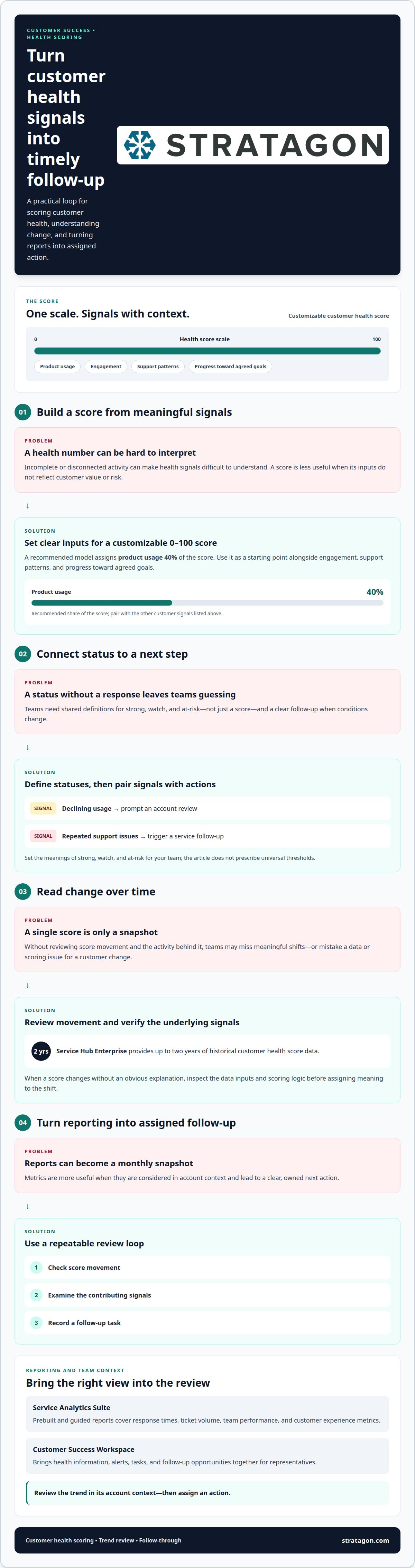
HubSpot Service Hub supports customizable customer health scores on a 0-100 scale. Build the score from behaviors that indicate value or risk, then align its inputs with your customer success model. A recommended model assigns product usage 40% of the score. Use that as a starting point, alongside engagement, support patterns, and progress toward agreed goals.
Keep scores interpretable. Define what strong, watch, and at-risk statuses mean for your team, then connect each status to a next step. For example, declining usage could prompt an account review, while repeated support issues could trigger a service follow-up. Service Hub Enterprise provides up to two years of historical customer health score data, helping teams review changes over time.
Reporting and Trend Analytics
Service Analytics Suite provides prebuilt and guided reports on response times, ticket volume, team performance, and customer experience metrics. Customer Success Workspace brings health information, alerts, tasks, and follow-up opportunities together for representatives. These views help teams turn a metric into an assigned, timely action instead of treating reporting as a monthly snapshot.
Customer success reporting in Service Hub can combine health trends with service activity, helping teams see whether account conditions are changing alongside ticket patterns or response performance. Start with a specific reporting question, such as which accounts need follow-up or whether response times are shifting. Review the relevant trend in its account context before assigning an action.
Build a repeatable review rhythm: check score movement, examine the contributing signals, and record a follow-up task. If a score changes without an obvious explanation in the underlying activity, inspect the data inputs and scoring logic. This helps distinguish a meaningful change from a configuration issue and gives success, service, and account teams a shared basis for decisions.
HubSpot Service Hub lets companies provide a branded customer portal where customers can view tickets, track progress, and communicate with support teams. That visibility can also support conversations about service trends and follow-up.
Customer onboarding and renewal playbooks
Service Hub connects onboarding activity with customer records, tickets, and follow-up tasks. Teams can use these workflows to track progress, prepare for renewals, and surface churn risks through defined signals.
Renewal and Retention Tracking
When a deal closes, Service Hub can automatically create an onboarding ticket, giving the sales-to-service handoff a clear starting point. Set ticket stages for kickoff, configuration, training, and first value. Assign an owner, due date, and completion criteria to each milestone. These details help teams identify stalled onboarding and coordinate timely customer follow-up.
For renewal tracking, maintain customer properties for renewal date, account owner, contract status, and next action. Use these fields to organize task queues and views around renewal readiness. A playbook can prompt the account owner to review outcomes, unresolved issues, and future goals before a renewal conversation. Compare renewed, expanded, and ended accounts across consistent periods to identify retention patterns.
Acquiring a new customer costs 5-25 times as much as retaining an existing customer. A defined renewal process helps teams give existing accounts deliberate attention, rather than relying on scattered reminders.
Churn Risk Monitoring
Service Hub can bring customer health context, alerts, tasks, and follow-up opportunities into the Customer Success Workspace. Define which signals warrant action, such as a declining health score, unresolved tickets, or missed onboarding milestones. Connect each signal to an owner and a specific next step. For example, repeated support issues might trigger an account review and customer check-in.
Use a consistent risk workflow: record the concern, assign responsibility, and track whether follow-up resolved it. Ticket volume or response-time trends can add service context, while account activity helps explain what may have changed. Review open risks alongside renewal timing to prioritize outreach based on account needs.
Churn monitoring works best when teams distinguish a warning signal from a confirmed outcome. A score can prompt investigation, but the owner should record the customer context behind it. This creates a useful record for later reviews and helps teams refine playbooks around recurring causes.
Which Service Hub features support customer success, such as customer health scoring, playbooks, and success plans?
Service Hub connects customer context, service activity, and follow-up in coordinated workflows. Teams can use its workspace, health scores, tickets, and reporting to organize customer success actions.
Customer Success Workspace and Health Scores
The Customer Success Workspace gives representatives visibility into customer health, alerts, tasks, and follow-up opportunities. Teams can use the workspace to review assigned records and manage alerts. Customizable health scores provide a consistent signal for prioritizing accounts, while account records supply context for deciding what action fits.
Service Hub also supports operational playbooks through configurable tasks, ticket stages, and workflows. For example, an account review can prompt a task, assign an owner, and record the agreed next step. Treat success plans as processes your team defines and tracks, rather than assuming a particular template. Clear ownership keeps each customer action connected to its purpose.
Service, Feedback, and Reporting Tools
Tickets can be created automatically from closed deals, forms, chat, or shared inboxes, giving customer teams a structured way to track requests alongside account work. A branded customer portal lets customers view tickets, follow progress, and communicate with support. A knowledge base can help customers find answers independently and provide training data for AI agents.
For feedback, Service Hub includes CSAT, CES, NPS, and custom surveys. Its Service Analytics Suite offers guided and prebuilt reporting on response times, ticket volume, team performance, and customer experience metrics. Exports from the Customer Success Workspace can include up to 1,000 associated records by default, which helps teams use account data in broader reviews.
The Customer Success Workspace is available with Service Hub Professional and Enterprise subscriptions. Align selected features with your workflows, reporting needs, and operating model before configuration. Explore HubSpot implementation services to align customer success workflows with your CRM.
Help Desk centralizes support conversations, allowing representatives to respond, update ticket status, and move between requests. For longer-term account reviews, HubSpot Service Hub Enterprise provides up to 2 years of historical customer health score data. Most consumer services companies can become operational with HubSpot within 2-4 weeks with onboarding support and implementation guidance, helping teams plan the rollout alongside their customer success workflows.
Stratagon: HubSpot CRM Implementation
Stratagon helps organizations align HubSpot CRM configuration with customer success processes. Turn to its HubSpot CRM Implementation when customer records, handoffs, health signals, or renewal workflows need a clearer operating structure.
The work can connect customer data, service workflows, and team responsibilities, giving success managers useful context for follow-up. Stratagon can also bring digital transformation and Sales Enablement into the wider operating model when customer-facing teams need stronger alignment. The focus is practical: configure the CRM around how your teams manage accounts, act on customer signals, and coordinate across functions.
For a considered next step, contact Stratagon to discuss your HubSpot implementation needs.
Make customer success part of your operating model
Treat customer success as a shared operating priority, not a set of disconnected tasks. A deliberate approach to HubSpot Service Hub for customer success teams can align customer-facing processes with broader business goals. Start by defining what teams need to know, which decisions customer signals should inform, and how sales, service, and marketing will coordinate around each account.
Stratagon supports this work through HubSpot CRM Implementation and digital transformation. For organizations connecting customer success with broader growth priorities, Account-Based Marketing (ABM) can also help align account engagement across teams. The right configuration depends on your workflows, data, and operating priorities, so begin with the outcomes your teams need the system to support.
Contact Stratagon to discuss your goals and shape a practical next step for your customer success operation.
Frequently Asked Questions
What are the current HubSpot Service Hub plans, pricing, and feature limits in the United States?
The Customer Success Workspace is available with Professional and Enterprise; feature access and limits vary by subscription.
What do customer reviews say about HubSpot Service Hub for customer success teams?
Feedback varies with team needs and configuration. Assess comments about data organization, workflow setup, and feature fit against the tasks your team plans to manage.